
Adding a Multi-select Problem#
You add multi-select problems in Studio by selecting the Problem component. In the problem editor, select the Multi-select option. Fill in the fields on this screen to create your problem.

Creating a multi-select problem is as simple as:
Editing the Display Name. Click the pen icon to edit.
Filling in the Question field.
Filling in the Explanation field. When this is shown to learners is based on the selection in the Show answer panel on the right.
Filling in the Answer fields. Select the correct answer(s) by ticking off the checkbox(es). Additional answers can be added by clicking the Add answer button. Answers can be deleted by clicking the trash can icon. Feedback can be provided for each answer. More information on feedback can be found in the following section.
Selecting and filling in any desired settings on the right.
If you have any questions on the specifics of using the simple editor, please check out The Simple Editor and Defining Settings for Problem Components.
Adding Feedback#
For an overview of feedback in problems, see Adding Feedback and Hints to a Problem. For multi-select problems, you can add feedback for each of the answer options you provide in the problem. You can also identify different combinations of answer options that learners are likely to select, and add group feedback for those combinations.
Adding Feedback for Individual Answers#
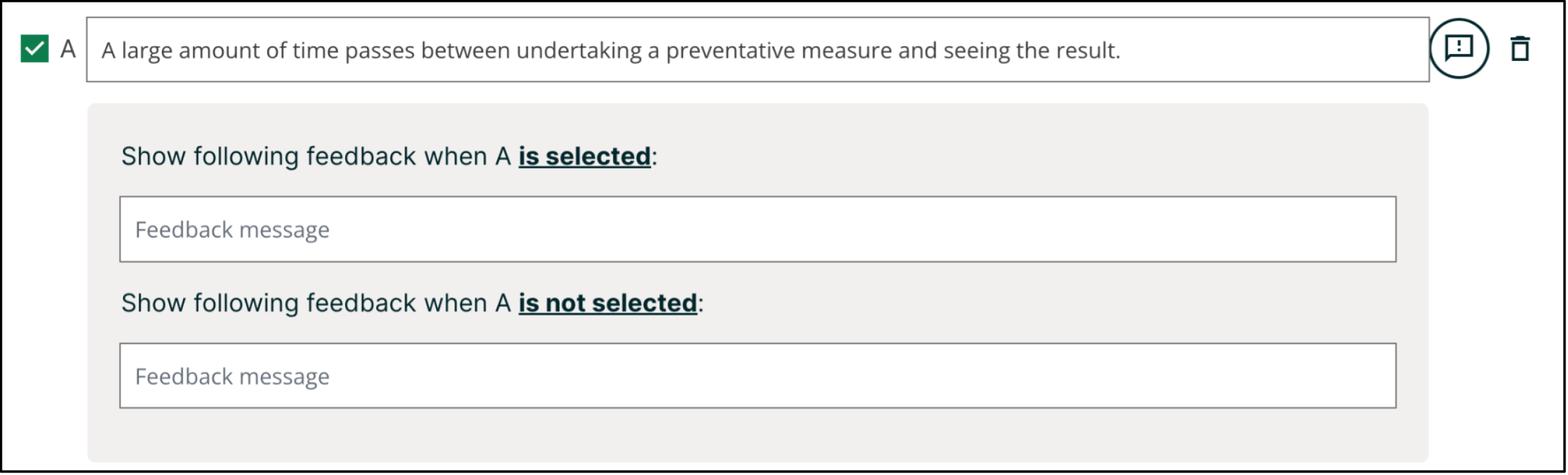
In multi-select problems, you can provide feedback for each answer that a learner can select, with distinct feedback depending on whether or not the learner selects that answer. This means that there are several possible types of feedback.
The learner selects a correct answer. This type of feedback should indicate why the answer is correct.
The learner does not select a correct answer. This type of feedback should indicate that the learner missed checking this answer and why it is correct.
The learner selects an incorrect answer. This type of feedback should indicate that the learner incorrectly checked this answer and why it is incorrect.
The learner does not select an incorrect answer. This type of feedback should reinforce why the learner correctly left this answer unselected.
You can access the feedback panel shown below by clicking the button to the right of the answer text.
Adding Group Feedback#
You can configure the multi-select problem to provide group feedback. Group feedback is feedback given for a specific combination of answers. For example, if you have three possible answers in the problem, you can define specific feedback for when a learner selects each combination of possible options.
A
B
C
A, B
B, C
A, C
A, B, C
For problems with more than three answers, providing specific feedback for each combination can become difficult. For such problems, you might choose to define group feedback for more likely combinations of answers or for combinations of answers that reflect common learner misunderstandings. If you do not define feedback for a combination that a learner selects, the learner receives feedback for the individual selections.
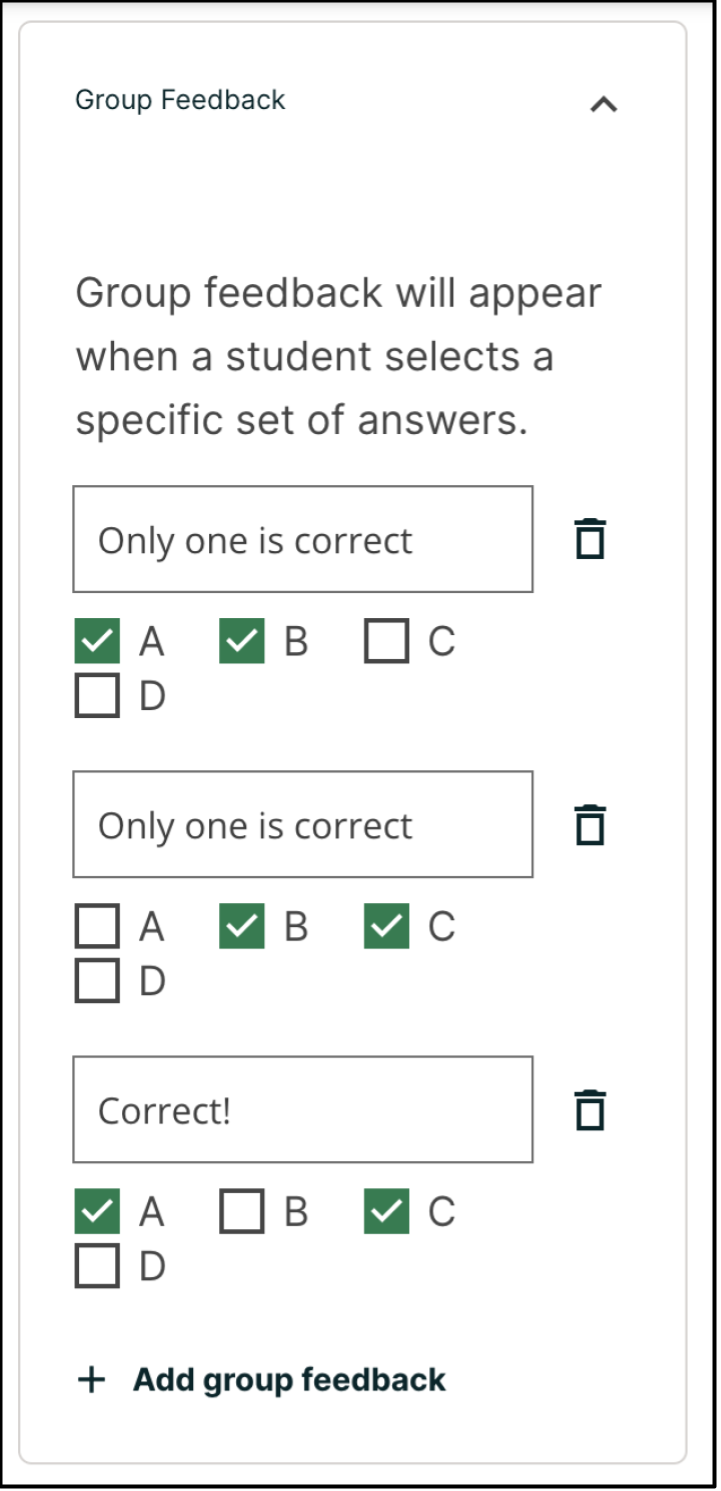
Group feedback can be entered in the Group Feedback panel on the right of the editor. The example below shows feedback for combinations of (A, B), (B, C) and (A, C) respectively.
Note
If you configure individual option feedback for every answer, and you also provide group feedback, when learners select the exact combination of answer choices defined, they only see the compound feedback. In this example, learners who select apple (A), pumpkin (B), and tomato (D) see the message “An apple, pumpkin, and tomato are all fruits as they are all the fertilized ovaries of a plant and contain seeds.” They do not also see the individual feedback for selecting A, B, and D, and for leaving C unselected.
Adding Hints#
You can add hints to a multi-select problem. For an overview of hints in problems, see Adding Feedback and Hints to a Problem.
Editing Multi-select Problems using the Advanced Editor#
If the simple editor is not enough to meet your needs, you can switch over to the advanced editor. In the setting panels on the right of the editor, click Show advanced settings, then scroll down and click Switch to advanced editor.
You can use the advanced editor to identify the elements of a multi-select problem with OLX. For more information, see Multi-select Problem OLX Reference. To format equations, you can use MathJax. For more information, see MathJax for Mathematics.
You can see the OLX for the example problem from the Overview section below.
<problem>
  <choiceresponse>
    <label>Learning about the benefits of preventative health care can be
    particularly difficult.</label>
    <description>Check all of the options below that might be reasons why.</description>
    <checkboxgroup>
      <choice correct="true">A large amount of time passes between
       undertaking a preventative measure and seeing the result.</choice>
      <choice correct="false">Non-immunized people will always fall sick.</choice>
      <choice correct="true">If others are immunized, fewer people will fall
       sick regardless of a particular individual's choice to get immunized
       or not.</choice>
      <choice correct="true">Trust in health care professionals and
       government officials is fragile.</choice>
    </checkboxgroup>
    <solution>
      <div class="detailed-solution">
        <p>Explanation</p>
        <p>People who are not immunized against a disease might still not
         fall sick from the disease. If someone is trying to learn whether
         or not preventative measures against the disease have any impact,
         he or she might see these people and conclude, since they have
         remained healthy despite not being immunized, that immunizations
         have no effect. Consequently, he or she would tend to believe that
         immunization (or other preventative measures) have fewer benefits
         than they actually do.</p>
      </div>
    </solution>
  </choiceresponse>
</problem>
Note
You can begin work on the problem in the simple editor, and then switch to the advanced editor. However, after you save any advanced OLX changes you make in the advanced editor, you may not be able to cannot switch back to the simple editor.
Adding Feedback#
There are several types of feedback you can add for a multi-select problem and different ways to configure them:
Adding Feedback for Individual Answers#
In the advanced editor, you configure feedback with the following syntax.
<choice correct="true">Choice label
  <choicehint selected="true">Feedback for when learner selects this
    answer.</choicehint>
  <choicehint selected="false">Feedback for when learner does not select
    this answer.</choicehint>
</choice>
For example, the following problem has feedback for each answer.
<problem>
  <multiplechoiceresponse>
    <label>Which of the following is an example of a vegetable?</label>
    <description>You can select only one option.</description>
    <choicegroup type="MultipleChoice">
      <choice correct="false">apple
        <choicehint>An apple is the fertilized ovary that comes from an apple
        tree and contains seeds classifying it as a fruit.</choicehint>
      </choice>
      <choice correct="false">pumpkin
        <choicehint>A pumpkin is the fertilized ovary of a squash plant
        and contains seeds classifying it as a fruit.</choicehint>
      </choice>
      <choice correct="true">potato
        <choicehint>A potato is an edible part of a plant in tuber form and
        is classified as a vegetable.</choicehint>
      </choice>
      <choice correct="false">tomato
        <choicehint>Many people mistakenly think a tomato is a vegetable.
        However, because a tomato is the fertilized ovary of a tomato plant
        and contains seeds it is classified as a fruit.</choicehint>
      </choice>
    </choicegroup>
  </multiplechoiceresponse>
</problem>
Adding Group Feedback#
In the advanced editor, you define group feedback by adding a <compoundhint>
element within the <checkboxgroup> element.
    .
    .
    .
  </choice>
  <compoundhint value="Answer Combination">Feedback when learner selects
   this combination of answers.</compoundhint>
</checkboxgroup>
For example, the following group feedback is used when learners select options A, B, and D or A, B, C, and D.
    .
    .
    .
  </choice>
  <compoundhint value="A B D">An apple, pumpkin, and tomato are all
   fruits as they all are fertilized ovaries of a plant and contain
   seeds.</compoundhint>
  <compoundhint value="A B C D">You are correct that an apple, pumpkin,
   and tomato are all fruits as they all are fertilized ovaries of a
   plant and contain seeds. However, a potato is not a fruit as it is an
   edible part of a plant in tuber form and is classified as a vegetable.
  </compoundhint>
</checkboxgroup>
Adding Hints#
See Adding Feedback and Hints to a Problem for more information on adding hints to a problem.
See also
Multi-select Problem (reference)
Adding Feedback and Hints to a Problem (how to)
Multi-select Problem OLX Reference (reference)
Awarding Partial Credit (how to)