
Open edX Events#
Overview#
Open edX Events provide a mechanism for extending the platform by enabling developers to listen to Open edX-specific Django signals emitted by various services and respond accordingly. This allows for customized reactions to actions or changes within the platform without modifying the Open edX platform codebase, with the main goal of minimizing maintenance efforts for the Open edX project and plugin maintainers.
What Are Open edX Events?#
Open edX Events are signals emitted by a service (e.g., LMS, CMS, or others) within the Open edX ecosystem to notify that an action has occurred. For example, a user may have registered, logged in, or created a course.
These events are built on top of Django signals, inheriting their behavior while also incorporating metadata and actions specific to the Open edX ecosystem, making them uniquely suited for the Open edX use cases. Since they are essentially Django signals tailored to the Open edX platform’s specific needs, we can refer to Django Signals Documentation for a more detailed understanding of Open edX Events.
Note
Django includes a “signal dispatcher”, which helps decoupled applications get notified when actions occur elsewhere in the framework. In a nutshell, signals allow certain senders to notify a set of receivers that some action has taken place. They’re especially useful when many pieces of code may be interested in the same events.
Events are primarily used as a communication method between internal services by leveraging Django Signals and external services using the Open edX Event Bus, making them the standard communication mechanism within the Open edX ecosystem.
How Do Open edX Events Work?#
Open edX Events are implemented by a class called OpenEdxPublicSignal, which inherits from Django’s Signals class and adds behaviors specific to the Open edX ecosystem. Thanks to this design, OpenEdxPublicSignal leverages the functionality of Django signals, allowing developers to apply their existing knowledge of the Django framework. You can review the Open edX Events Tooling documentation for more information on the tooling available for working with Open edX events.
Architectural Diagram#
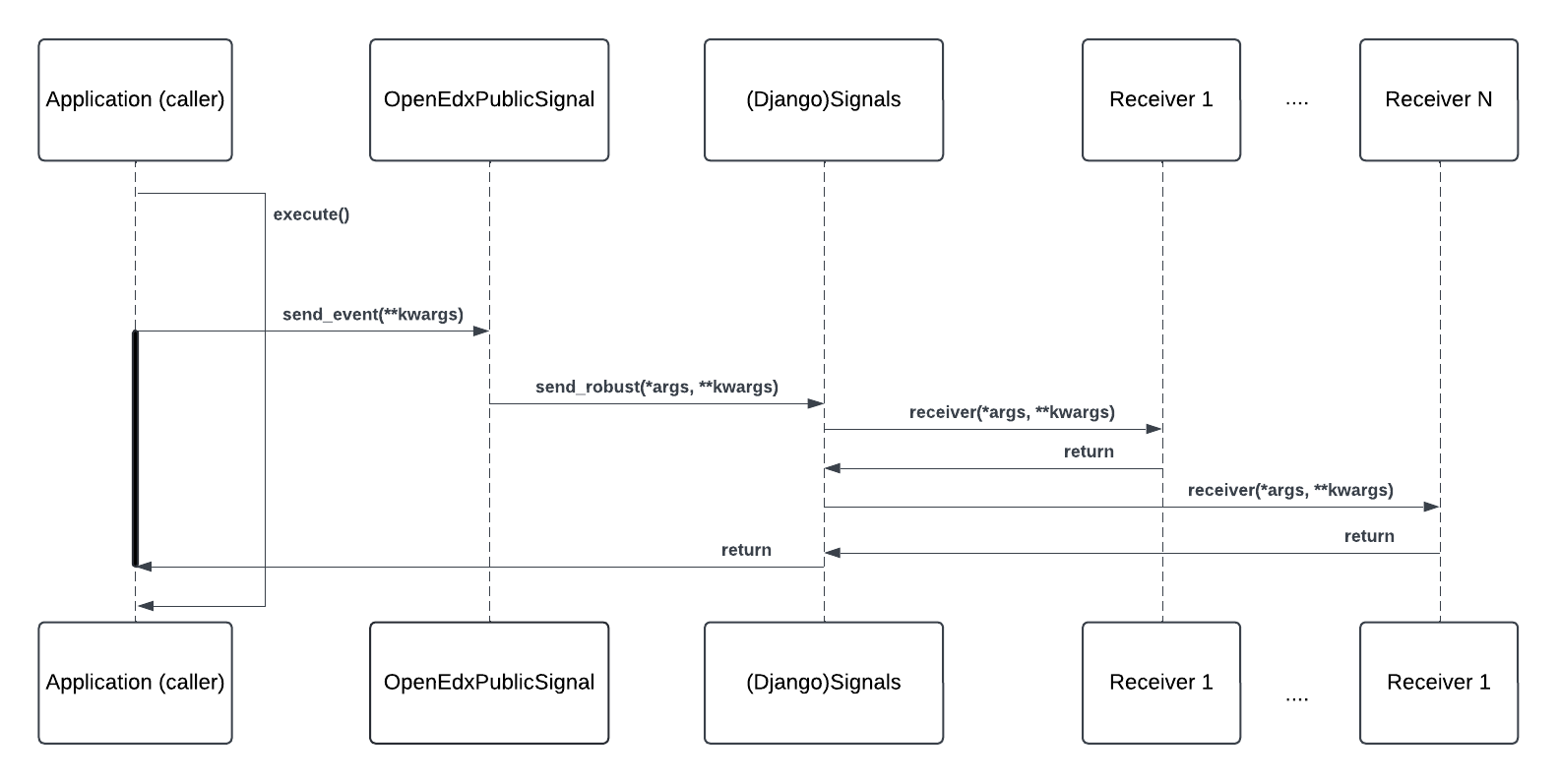
In this diagram, we illustrate the workflow of emitting and processing an Open edX Event:
Components#
Application (caller): The application component that emits the event. Developers may have emitted this event in a key section of the application logic, signaling that a specific action has occurred. E.g., a user has enrolled in a course, triggering the COURSE_ENROLLMENT_CREATED event.
OpenEdxPublicSignal: The class that implements all methods used to manage sending the event. As mentioned previously, this class inherits from Django’s Signals class and adds Open edX-specific metadata and behaviors.
Django Signals: The Django framework’s built-in signal mechanism.
Receiver1…ReceiverN: The components that listen to the event and execute custom logic in response. These receivers are implemented as Django signal receivers.
Workflow#
An application (caller) emits an event by calling the send_event method implemented by OpenEdxPublicSignal which the event inherits from.
The caller passes the event payload to the send_event method. The event payload is the data associated with the event that is passed to the receivers when it’s triggered. It uses data attribute classes (e.g.
CourseEnrollmentData,UserData, etc.) to carry data about the event.The send_event method generates Open edX-specific metadata for the event on the fly, like the event version or the timestamp when the event was sent. The event receivers can access this metadata during their processing.
After, the send_event method calls the send or send_robust method from Django Signals under the hood. The
sendmethod is used for development and testing, while thesend_robustmethod is used in production to ensure receivers don’t raise exceptions halting the application process.Building on Django Signals allows us to use the same Django signals registry mechanism for receiver management. This means that developers can register signal receivers in their plugins for Open edX Events in the same way they would for Django signals.
All registered receivers are executed in the order they were registered. Each receiver processes the event data and performs the necessary actions.
After all receivers for the event have been executed, the process continues with the application logic.
Here is an example of an event that saves a user’s notification preferences when they enroll in a course:
A user enrolls in a course, triggering the COURSE_ENROLLMENT_CREATED event. This event includes information about the user, course, and enrollment details.
A signal receiver listening for the
COURSE_ENROLLMENT_CREATEDevent is called and processes the event data. In this case, it would be the course_enrollment_post_save receiver.The signal receiver creates a notification preference for the user, enabling them to receive notifications about the course.
The application continues with the course enrollment process.
The Django Signals Documentation provides a more detailed explanation of how Django signals work.
How Are Open edX Events Used?#
As mentioned previously, developers can listen to Open edX Events by registering signal receivers from their Open edX Django plugins that respond to the emitted events or by using the Open edX Event Bus to send events to external services.
For more information on using Open edX Events, refer to the Create a New Open edX Event with Long-Term Support how-to guide. We also encourage you to explore the Real-Life Use Cases for Open edX Events section for real-life examples of how Open edX Events are used by the community.
Maintenance chart
Review Date |
Reviewer |
Release |
Test situation |
2025-02-05 |
Maria Grimaldi |
Sumac |
Pass. |