
Open edX Filters#
Overview#
As mentioned in the docs.openedx.org:developers/concepts/hooks_extension_framework docs, Open edX filters provide a mechanism for modifying the platform’s behavior by altering runtime data or halting execution based on specific conditions. Filters allow developers to implement application flow control based on their business logic or requirements without directly modifying the application code.
Throughout this document, we will refer to Open edX Filters as filters interchangeably.
What are Open edX Filters?#
An Open edX Filter is a pipeline mechanism that executes a series of functions when configured. Each function receives input arguments, which are data used by the process in execution, and returns the same arguments, possibly modified. Given this design, filters can modify the application flow according to the specified configuration, altering or adding new behaviors during execution time.
How do Open edX Filters work?#
Open edX Filters are implemented using an accumulative pipeline mechanism, which executes a series of functions in a specific order. Each function in the pipeline receives the output of the previous function as input, allowing developers to build complex processing logic by chaining multiple functions together. The pipeline ensures that the order of execution is maintained and that the result of a previous function is available to the current one in the form of a pipeline.
This pipeline mechanism is implemented by the OpenEdxPublicFilter class, which provides the necessary tools to fulfill the Open edX Filters requirements mentioned previously, such as ordered execution, configurability, interchangeable functions, argument definition, and cumulative behavior. This enables filters to modify the flow of the application dynamically during runtime based on predefined business logic or conditions. You can review the Open edX Filters Tooling for more information on the available methods and classes.
Architectural Diagram#
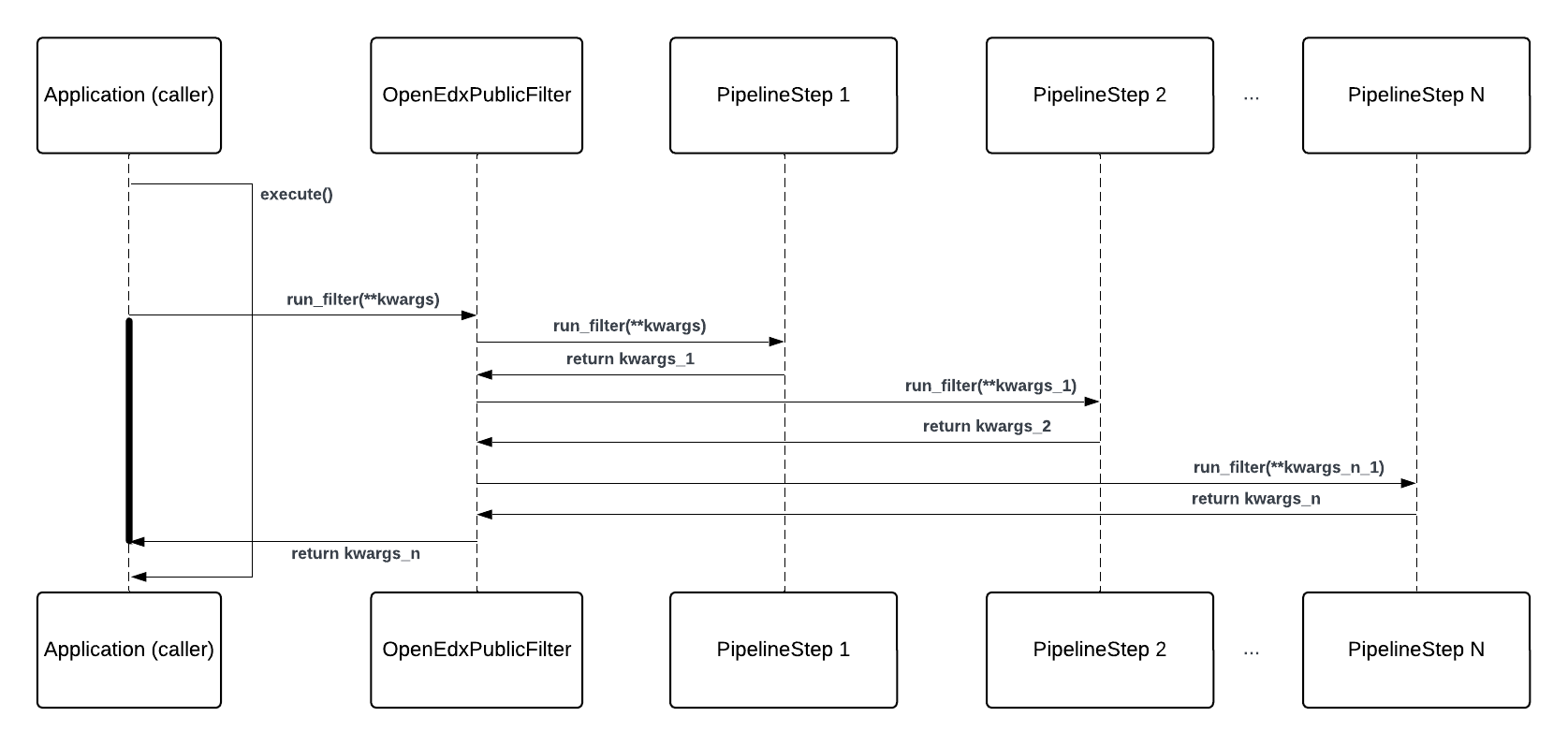
In this diagram, we illustrate the workflow of triggering an Open edX Filter:
Components#
Application (caller): The component that calls the filter during its execution, triggering the pipeline to process the input data. Developers may have added this call to a part of the application to include different behaviors. E.g., a user enrolls in a course, triggering the CourseEnrollmentStarted filter.
OpenEdxPublicFilter: The class that implements all methods used to manage the execution of the filter.PipelineStep1…N: The pipeline steps that are executed in sequence, each processing the input data and returning potentially modified data. These steps are defined by the developer to introduce additional behaviors. E.g., a pipeline step that checks user eligibility for enrollment.
Workflow#
An application component (caller) invokes the filter during its execution by calling the
run_filtermethod implemented by its filter definition.The caller passes the input data to the filter through the
run_filtermethod, this data are in-memory platform objects that the filter will process.The
run_filtermethod of the filter calls therun_pipelinemethod under the hood, which manages the execution of the filter’s pipeline.This method retrieves the configuration from
OPEN_EDX_FILTERS_CONFIG, which defines a list of N functions \(f_1, f_2, \ldots, f_{n}\) that will be executed.Then it executes each function in the pipeline sequentially, starting with \(f_1\), which processes the input arguments
kwargsand applies the developer’s operations, returning potentially modified argumentskwargs_1.The next function (if there are more than one) \(f_2\) receives the potentially modified arguments
kwargs_1and applies further operations, returning another modified set of argumentskwargs_2. This process continues through the list of functions.Each subsequent function receives the output from the previous function and returns its modified output until all functions have been executed.
At any point in the pipeline, a developer can halt execution by raising an exception, based on conditions defined in the processing logic, to stop the application flow. Let’s assume that \(f_{2}\) raises an exception instead of returning the modified arguments
kwargs_2. In this case, the pipeline stops, and therun_pipelinemethod raises the exception to the caller as the final output. From there the caller can handle the exception as needed.If no exceptions are raised, the pipeline continues executing the functions until the final function \(f_{n}\) has been executed.
The final modified arguments
kwargs_nare returned to the caller, which may use them for the remaining part of its execution.
Each function in the pipeline has the ability to modify the input data, add new data, or halt execution based on specific conditions, such as raising exceptions if certain criteria is not met. This pipeline structure ensures that complex business logic can be applied during runtime without directly altering the application code.
Real-Life Example#
Here’s an example of the CourseEnrollmentStarted filter in action:
A user enrolls in a course, triggering the CourseEnrollmentStarted filter by calling the
run_filtermethod with the enrollment details. This filter processes information about the user, course, and enrollment details.The
run_pipelinemethod executes a series of functions configured inOPEN_EDX_FILTERS_CONFIG, e.g. checking user eligibility for enrollment or updating the enrollment status in a third-party system.Each function can modify the input data or halt the process based on business logic, e.g. denying enrollment if the user is ineligible.
The final output of the pipeline, such as the updated enrollment details, is returned to the caller, or an exception is raised if the user is not eligible.
The process is complete once all functions in the pipeline have executed, and the enrollment process continues based on the final output.
By running filters in key places of the Open edX platform, developers can extend the platform’s functionality in a flexible and maintainable way.
How are Open edX Filters used?#
Developers can implement functions in an Open edX Django plugin, configure them for a particular filter in the OPEN_EDX_FILTERS_CONFIG setting, and modify the application flow when a the filter in question is invoked by the process in execution. These functions can the application’s behavior by altering data, adding new data, or stopping execution by raising exceptions. For example, a filter can stop a student’s enrollment if certain conditions, such as business rules, are not met.
For more information on how to use Open edX Filters, refer to the how-tos section.